Jump to content

Search the Community

Showing results for tags 'install'.

  • Search By Tags

    Type tags separated by commas.
  • Search By Author

Content Type


Forums

  • Skylords Reborn
    • Announcements
    • Updates
    • Events and Tournaments
    • Contribute to the project
  • Support
    • Technical Support
    • Report A Bug
    • Ban Appeals
  • Community
    • Suggestions
    • General Talk
    • Media
    • Off-Topic
    • Development
  • Gameplay
    • Cards
    • New Player Help and Guides
    • Deck Building and Colour Strategies
    • PvE
    • PvP
    • Maps
    • Campaign Maps
  • Recruitment
    • Art
    • Game Design
    • Map Making
    • Community
    • Development

Find results in...

Find results that contain...


Date Created

  • Start

    End


Last Updated

  • Start

    End


Filter by number of...

Joined

  • Start

    End


Group


Battle.net


Discord


Facebook


LinkedIn


Reddit


Steam


Skype


Twitter


Website URL


Other


Location


Interests

Found 2 results

  1. When I first attempted to launch Skylords the patcher appeared momentarily, updated 1/2 then 2/2 then disappeared, there were no additional popups or errors. Subsequent attempts to launch get no patcher, and nothing happens. I've looked over the pinned thread: 1. Not an install issue, it installs correctly and without error. 2. Not an install issue, it installs correctly and without error. 3. Install folder was made an exception for both anti-viruses I have (Windows Defender, and MalwareBytes) before installation. 4. Attempted, no change 5. Set to Allow apps from anywhere 6. This feature is disabled 7. From 3 installation attempts the BattleForge folder has only been created a single time. When I deleted the folder, it was not recreated on subsequent attempts to run the game. 8. Manually installed all three, no change even after restart 9. My graphics card has the latest drivers. 10. After restoring the BattleForge folder I deleted in step 7, my MaxShaders default value is "0", not false. However "0", false, and 768 all failed to solve the issue 11. Attempted, no change 12. The game does not launch 13. The game does not launch 14. The game does not launch 15. This seems to be the closest to my issue, however @silverfrost98 stopped replying 16. Here's a screenshot of my install folder, as well as the latest file in my Diag folder. Running SkylordsRebornUpdater does not create new lines in the log files. Event viewer gives me this error: Faulting application name: SkylordsRebornUpdater.exe, version: 1.0.0.0, time stamp: 0x68278271 Faulting module name: KERNELBASE.dll, version: 10.0.19041.2913, time stamp: 0xa1c3e870 Exception code: 0xc0000602 Fault offset: 0x000000000012d862 Faulting process id: 0x30a4 Faulting application start time: 0x01dc0641b1db2f6e Faulting application path: D:\Games\Skylords Reborn\SkylordsRebornUpdater.exe Faulting module path: C:\WINDOWS\System32\KERNELBASE.dll Report Id: b75a0b4d-1ecb-4a83-b657-1e4acc54d170 Faulting package full name: Faulting package-relative application ID: _log_proxy_latest.log
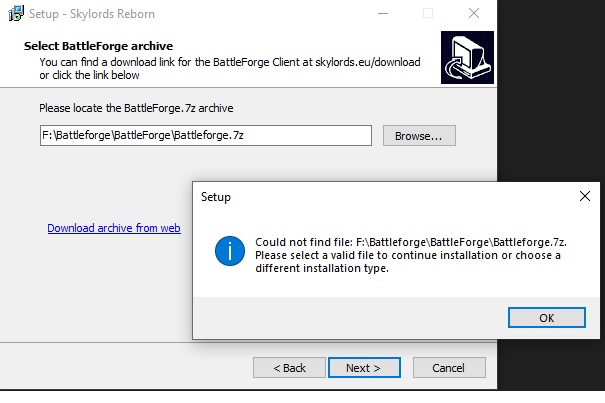
  2. Hello there, I tried to install the game but i can't. It seems something is missing. Idk how to fix it. Can someone help me 😳 Greetings
×
×
  • Create New...

Important Information

We have placed cookies on your device to help make this website better. You can adjust your cookie settings, otherwise we'll assume you're okay to continue. Terms of Use