Search the Community
Showing results for tags 'game lobby'.
Found 1 result
-
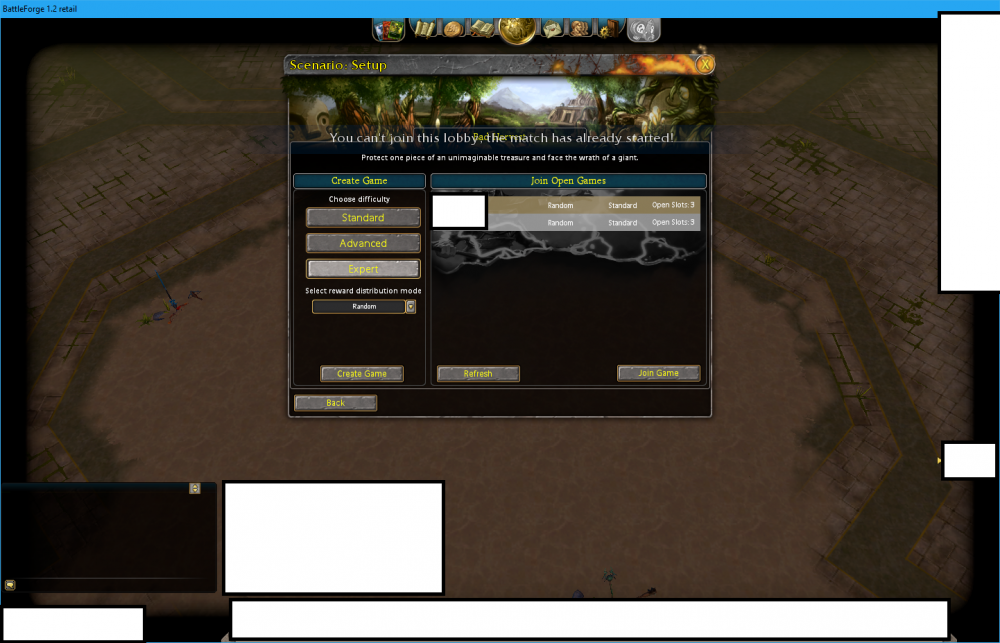
 NAME: You can't join this lobby, the match has already started! SEVERITY: 2 LOCATION: Join Open Games (bad harvest) 95% REPRODUCIBILITY: This happened at least 4 times now. Yesterday, tried restarting. Today restarted, it worked. On the map, click on bad harvest. There's 1 or 2 list. Click on a game, then click on join game. This happens likely, when I haven't play for several hours. Then when I open skylords, it happens. DESCRIPTION: This happened today and yesterday. I saw two open games for bad harvest. There both Standard or Advanced, made by different people. Open slots usually 2 or 3. I tried refreshing it, but still the same. I'n on the US. SCREENSHOT/VIDEO: Uploaded ADDITIONAL INFORMATION: Maybe in the code, once game is started, remove it from list and refresh the list. Or im guessing its thinking the game has started, but not. So that code shouldn't show up when game is in the list that has less than 4 members. Anyways, just a thought. Thanks guys!