Search the Community
Showing results for tags 'after update'.
Found 1 result
-
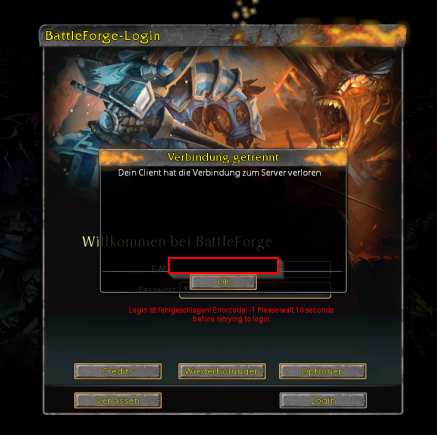
Before update everything was fine. Now i can't login. [INFO][UI (Lua)]: [00:00:01] SectionBrowser:SwitchSection to Login [INFO][UI (Lua)]: [00:00:01] SectionBrowser.SwitchSection: Opening section 'Login' [INFO][UI (Lua)]: [00:00:01] ScreenFlow:Next(bf1/ui/dialogs/pregame/login/pg_login_view.xml) [INFO][UI (Lua)]: [00:00:01] DoTransition: bf1/ui/dialogs/pregame/login/pg_login_view.xml [INFO][UI (Lua)]: [00:00:01] OnNextView! #0 [INFO][UI (Lua)]: [00:00:01] Creating view bf1/ui/dialogs/pregame/login/pg_login_view.xml [INFO][UI (Lua)]: [00:00:01] Created new task ReEnableLogin [INFO][UI (Lua)]: [00:00:01] PregameSection.Open [INFO][UI (Lua)]: [00:00:01] PregameSection.Open: Setting position on screen [INFO][UI (Lua)]: [00:00:01] PregameSection.Open: Initialize controller [INFO][UI (Lua)]: [00:00:01] Show ActiveView [INFO][UI (Lua)]: [00:00:01] PregameSection.Open [INFO][UI (Lua)]: [00:00:01] PregameSection.Open: Setting position on screen [INFO][UI (Lua)]: [00:00:01] PregameSection.Open: Initialize controller [INFO][UI (Lua)]: [00:00:01] Show ActiveView [INFO][UI (Lua)]: [00:00:01] Created new task ActivityCheck [INFO][NETWORK]: Timed out sending a Network Message with Interface Borderline, Message LoginAccountRMC in ...Diag\log.txt [WARN][NETWORK]: SSL_read: sslErr=5(SYSCALL) ret=0 wsaErr=0 [WARN][NETWORK]: CNetReceiveNetworkMessagesJob::Execute: CNetNotConnectedException received [INFO][NETWORK]: Timed out sending a Network Message with Interface PreGame, Message GetAlllLimitedPoolsForCharacterRMC [INFO][PREGAME]: CharacterRemote deletion. [INFO][UI (Lua)]: [00:01:22] pg_back_to_login [INFO][UI (Lua)]: [00:01:22] Restarting Section [INFO][UI (Lua)]: [00:01:22] StartScreen: bf1/ui/dialogs/pregame/login/pg_login_view.xml [INFO][UI (Lua)]: [00:01:22] CurrentScreen: bf1/ui/dialogs/pregame/login/pg_login_view.xml [INFO][UI (Lua)]: [00:01:22] ScreenFlow:Next(bf1/ui/dialogs/pregame/login/pg_login_view.xml) [INFO][UI (Lua)]: [00:01:22] Screen is already active, do nothing: bf1/ui/dialogs/pregame/login/pg_login_view.xml [INFO][UI (Lua)]: [00:01:24] SectionBrowser:Exit... [INFO][UI (Lua)]: [00:01:24] EXIT GAME