Search the Community
Showing results for tags 'Crashes'.
Found 3 results
-
hello everyone as the Skylords game has become burdensome for me, I decided to post this post, which maybe the devs will read, maybe not, the game has become unplayable for some time, neither in pvp nor pve mode, I have the equipment and a very good internet connection and this is happening 1. the game sometimes freezes every 10/15 sec 2. fps jumps from 100 to 2 / 3 are embarrassing 3. loss of connection every 3rd match on giga jams, as if I were playing on a microwave, 4. NOT TO MENTION THAT THE GAME IS DENSCHRINOZED EVERY MATCH 5. On average, 2/3 of 4 players remain in every second match 6. The game works worse every update. I regret to say that as of today the game is unplayable and driving me crazy :) star_border
-
It's been 2-3 days since the game started. I am constantly encountering this problem 😒. I don't know what's wrong but I'm pretty sure it's okay with my internet. crashdata.mdmp _log_proxy_latest.log
-
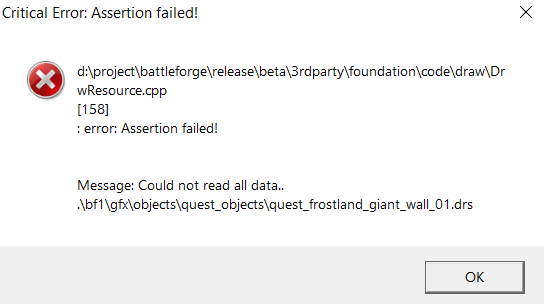
NAME: Game throws an error and crashesSEVERITY: 1LOCATION: (1/4) Loading Screen, The SoulTree solo Campaign REPRODUCIBILITY: ALWAYSDESCRIPTION: Every time I try to load the level, the game starts loading. When the loading bar on the loading screen is about 1/4, it takes a few moments (~10-20 Seconds) before I get a pop-up error. Once I get this notice, the game crashes. SCREENSHOT: ADDITIONAL INFORMATION: