Search the Community
Showing results for tags 'severe'.
Found 1 result
-
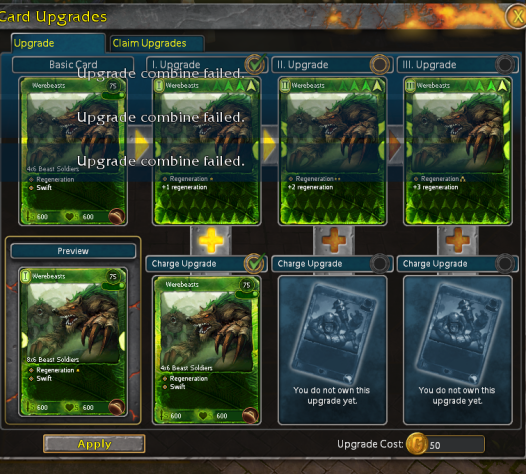
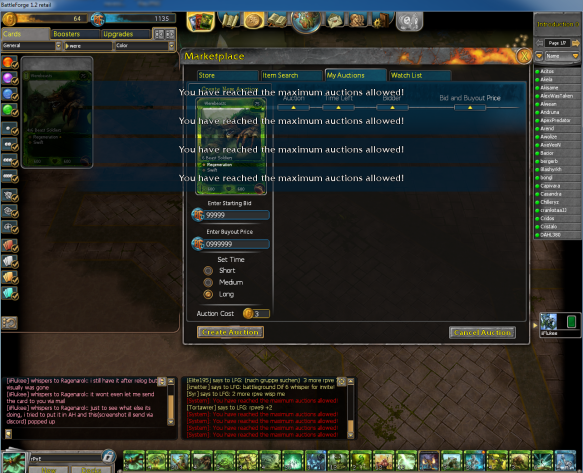
Severity: 1 Location: Collection / Upgrade panel / Trade Additional information: AFFECTS OTHER PLAYERS SEVERELY REPRODUCIBILITY: Have yet to be able to reproduce on a new card. However bug is attached to card and would appreciate card being destroyed / replaced. Description: As I bought a Werebeasts (via direct trade), I was experiencing lag and constant server freezes / server drop-outs. I received the card (my second copy) and the trade was successful. However I was unable to use the second copy of the card to charge my werebeasts in the upgrade panel. and received the "error: Upgrade combine failed" Detailed in attachment I contacted a friend, If I could give him the card and have him give it back to me. As he received the card, It deleted 3 of his charge cards from his werebeast and he lost his upgrades ADDITIONAL INFORMATION: the card in question has the bug attached to it and cannot be placed in the auction house, sent via mail or trade and is stuck in my friend's inventory Friend's In game name is iiFlukee, who can be reached on discord at " iiFlukee#4143 " My in game name is Ragenarok. I can also be reached on discord at " Ragenarok#1599 " I am part of the Discord Moderator team